Show Posts

This section allows you to view all posts made by this member. Note that you can only see posts made in areas you currently have access to.


Messages - charnj

Pages: [1]
1
latest version is 2.0.1.0 (tabletpro2010 download file)

when i updated, it doesnt show new version available anymore

2
Share Your Layout / Re: SOLIDWORKS Layout
« on: March 31, 2016, 07:10:48 pm »
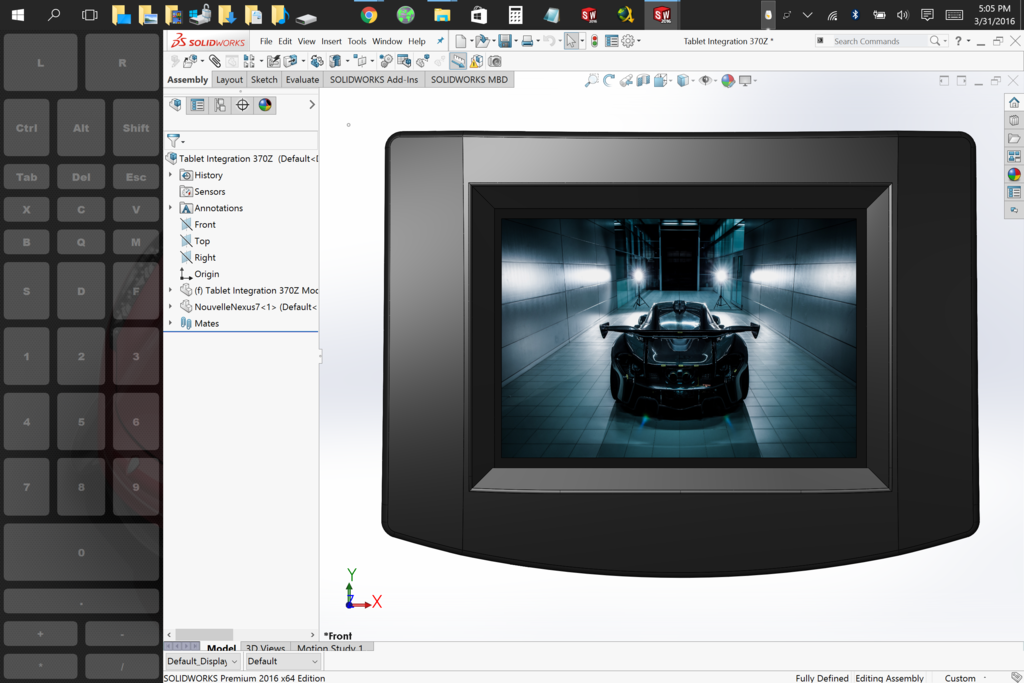
thanks!  really glad this program exists because i dont like to have the keyboard with me all the time.

here is my latest project:


3
How do I???? / Re: How do I set up the onscreen buttons?
« on: December 13, 2015, 11:31:23 am »
ah, ok. didn't realize that was there.  i just deleted it when i made my custom version without looking at what each initial button was

4
Share Your Layout / Re: SOLIDWORKS Layout
« on: December 13, 2015, 11:25:32 am »
sure, that would be cool.

let me know if you need anything else from me.

5
How do I???? / Re: How do I set up the onscreen buttons?
« on: December 12, 2015, 10:37:50 am »
Gary,

I think the only downside to that is if Andy uses that button to switch between modes or to access the settings.

Since there is a "docking" checkbox in the settings, that should override any movement capabilities.

6
Share Your Layout / SOLIDWORKS Layout
« on: December 11, 2015, 12:00:11 am »
Hi All,

I've used SOLIDWORKS to design 3D models and simulate FEA and CFD for the last 10 years.

SOLIDWORKS is a desktop application that uses a mouse and keyboard.  So I'm used to using keyboard shortcuts and mouse gestures to design more efficiently.

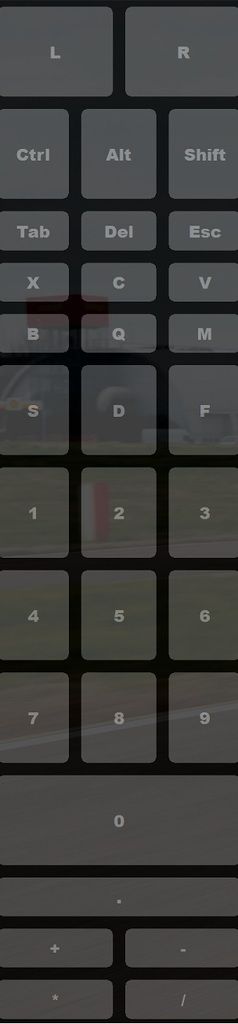
Here is my artist pad setup to achieve the same design flow:


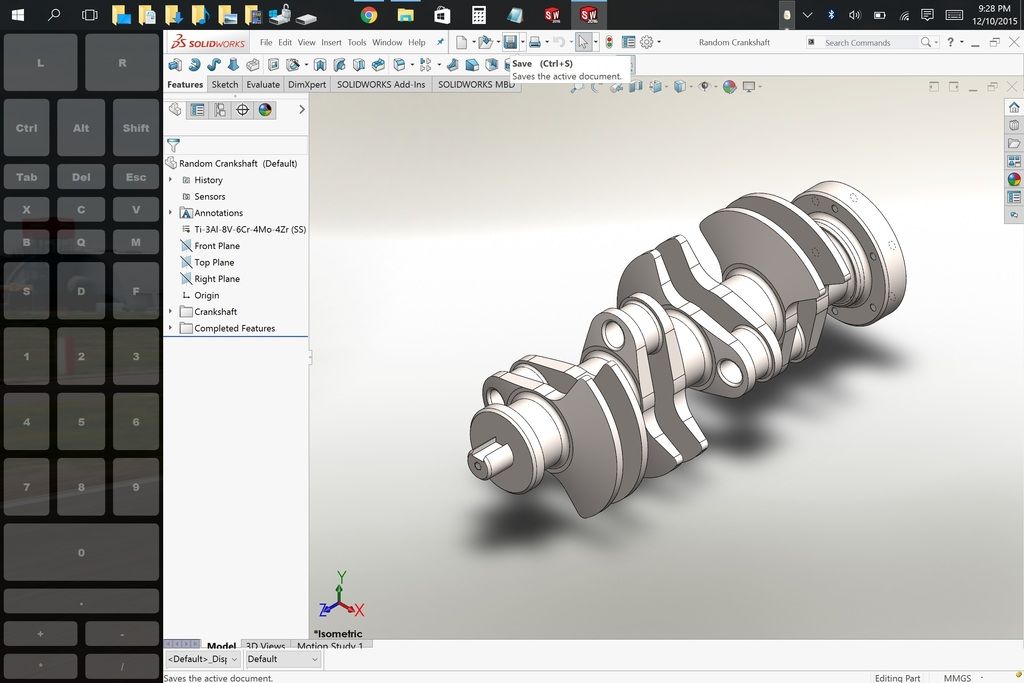
here is what it looks when I have the program open:


i'm not sure if i am going to keep the arithmetic hot keys at the bottom, but so far it's going quite well

i've attached my ini file for anyone who wants it.

7
Bugs / Re: Buttons not staying depressed in layout mode of beta 23
« on: December 10, 2015, 11:25:22 pm »
this would be a cool feature.

i just leave the ctrl, alt, shift toggled...i do find it a little frustrating when i forget to deselect the buttons when im in the zone desiging.

using on designated hot keys, not on a standard keyboard, is new to me.  but much better than having to deal with they onscreen keyboard taking more than a third of the screen.

8
Feature Requests / resizing of keyboard
« on: December 10, 2015, 11:13:18 pm »
i would love to see the program resize the on screen keyboard.

i know i can shrink they on screen keyboard, but i love using the full on screen keyboard because of the function buttons.

you can see, in the attachment, there is an overlap of they keyboard and the artist pad. hard to keep it full when taking a screenshot

i'm trying to only use my sp4 as a tablet, because, while the type keyboard is nice, it's really a limiting factor to owning a tablet.

9
Bugs / Re: control with numbers
« on: December 07, 2015, 11:17:37 pm »
after talking with Justice, setting up an artist pad, there is better performance with my setup.

i also had to change my numbers from "num X" to numbers "X".

after that, it worked like a charm.

ill be uploading my setup (ini) for anyone else who uses SOLIDWORKS

10
Bugs / Re: default pen settings
« on: December 07, 2015, 11:12:12 pm »
thanks justice.

after setting up an artist pad setup, performance is much better!

11
Bugs / default pen settings
« on: December 06, 2015, 09:49:43 pm »
so i saw this video on youtube where the user is experiencing issues with tabletpro based upon the pen setting of dominant hand control (located under start menu>settings>devices>pen>choose which hand you right with)

here is a link to the video

https://youtu.be/1YUrs7QpNI8?t=5m42s


and im noticing the same issue as well.  i even have the setting checked for, "allow simultaneous operation of pen and touch (HID) Note: it will depend on device" and i am using the core i7 SP4.  the user in the video is using a surface book.

even when i set the device settings to left hand, instead of right hand, i get some stutter, and certain buttons want to press twice in the left hand column. and since i am using left hand, i cant rest my right hand in the screen because it registers it as a right click.

my current setup is side mode on the left hand side.

credit goes to The CG Alchemist for finding this.

12
Bugs / Re: control with numbers
« on: December 05, 2015, 04:05:04 pm »
i guess i can always use the right click and create a mouse gesture to rotate.

13
Bugs / control with numbers
« on: December 05, 2015, 03:45:01 pm »
I bought this to be able to design on my SP4 withoutthe keyboard.  I use a software called SOLIDWORKS and in the software they have built in keyboard shortcuts that use "crtl + number" to help rotate views.

I designed a layout to have all of my normal shortcuts, but using control and a number doesn't seem to do anything.

not sure if it's something i did wrong or if this might be a bug.

would appreciate any help and input.

14
Install questions / Re: Problems using .ini layouts
« on: December 05, 2015, 02:59:27 pm »
nvm.  it was in my promo folder dor some reason

15
Install questions / Re: Problems using .ini layouts
« on: December 05, 2015, 02:58:03 pm »
so is the program we download from the microsoft store not the latest one?

i just purchased it as well and am having the same issue.  when i go to subscribe, it already has my email, but i havent gotten a new file to download.

Pages: [1]